Note: This guide is designed for the Baofeng UV-5R and similar models. Ensure you are legally licensed to transmit on the frequencies you program.
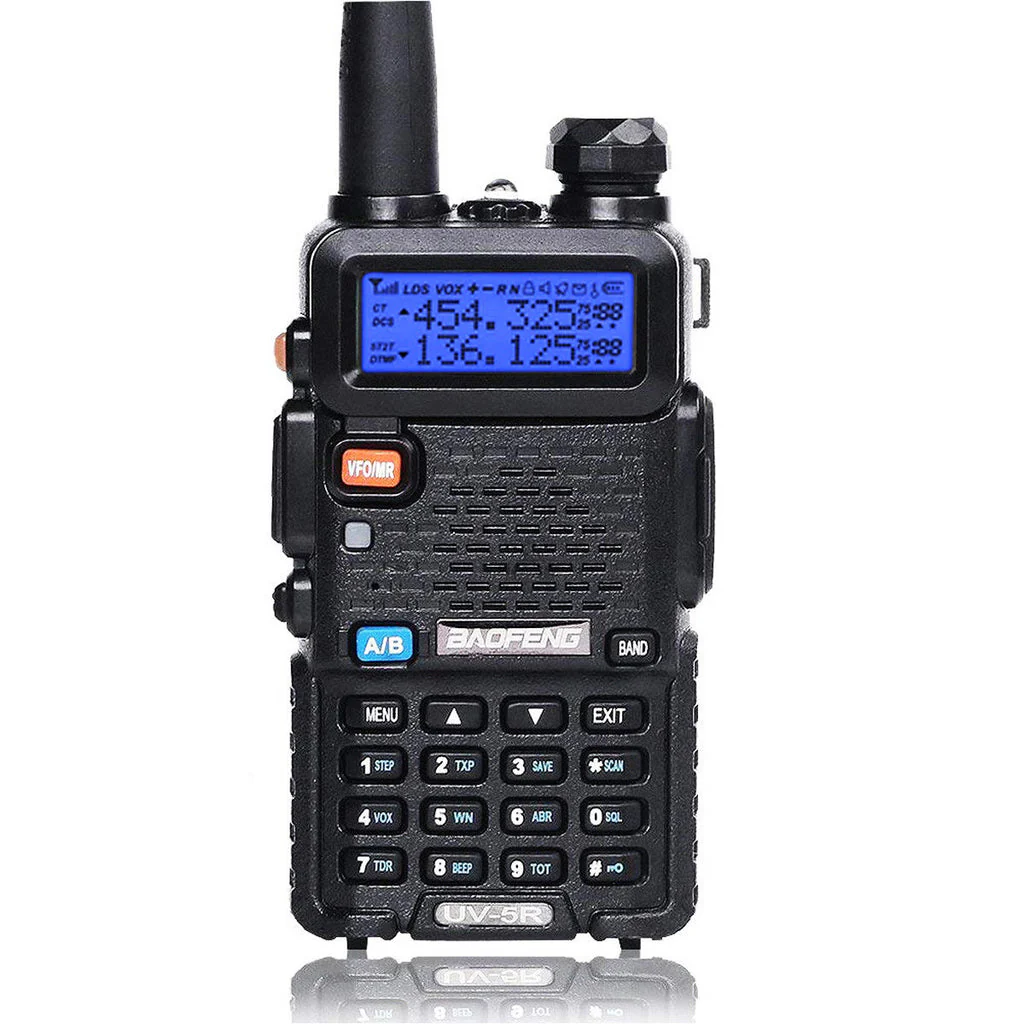
Quick Reference: Simplex Programming
For vehicle-to-vehicle communication (like our standard 146.460 MHz), follow these steps to save a channel.
- Switch to VFO Mode: Press the
VFO/MRbutton until you see a frequency (not a channel number) on the display. - Select Upper Display: Press
A/Bto move the arrow to the top line. - Delete Existing Channel:
- Press
MENU->28->MENU. - Select the channel number (e.g.,
001) you want to use. - Press
MENUto confirm deletion (voice may say "Cancelled" or "Confirmed"), thenEXIT.
- Press
- Enter Frequency: Type the desired frequency on the keypad (e.g.,
146460). - Save Channel:
- Press
MENU->27->MENU. - Select the same channel number you just deleted (e.g.,
001). - Press
MENUto confirm (voice says "Receiving Memory"), thenEXIT.
- Press
Quick Reference: Repeater Programming
Repeaters require a transmit offset and often a sub-audible tone (CTCSS/DCS) to open the repeater.
- Set Frequency: Follow steps 1-4 above to enter the Receive frequency.
- Set Offset Direction:
- Press
MENU->25->MENU. - Select
+or-based on the repeater info. - Press
MENU->EXIT.
- Press
- Set Offset Amount:
- Press
MENU->26->MENU. - Enter the offset (e.g.,
00.600for 2m,05.000for 70cm). - Press
MENU->EXIT.
- Press
- Set Transmit Tone (PL):
- Press
MENU->13(T-CTCS) ->MENU. - Select the tone frequency (e.g.,
100.0). - Press
MENU->EXIT.
- Press
- Save Receiving Frequency:
- Press
MENU->27->MENU. - Select your memory channel (e.g.,
002). - Press
MENU->EXIT.
- Press
- Save Transmitting Frequency (Critical Step!):
- Correction for Baofeng: You typically save to the Same Channel again.
- Press
MENU->27->MENU. - Select the SAME channel number (e.g.,
002). - Press
MENUto confirm (voice says "Transmitting Memory"), thenEXIT.
Essential Menu Settings
| Menu | Name | Setting | Description |
|---|---|---|---|
| 0 | SQL | 1-5 | Squelch level. Lower is more sensitive. |
| 2 | TXP | HIGH | Transmit power. |
| 7 | TDR | OFF | Dual Watch. Turn OFF for programming to avoid confusion. |
| 25 | SFT-D | OFF/+/ - | Frequency shift direction (for repeaters). |
| 26 | OFFSET | 00.600 | Frequency shift amount (standard 2m offset). |
| 13 | T-CTCS | OFF/Tone | Transmit Continuous Tone Coded Squelch System. |
Tips & Troubleshooting
- Can't enter frequency? Make sure you are in VFO Mode (frequency
mode), not Channel mode. Press
VFO/MR. - Menu not working? You cannot change some settings while in Channel Mode. Switch to Frequency Mode first.
- "Cancel" when saving? You must Delete the channel (Menu 28) before you can Save to it (Menu 27). Overwriting is not allowed directly.
- Chirp Software: For programming many channels, we highly recommend using a programming cable and the free CHIRP software.